What Makes an AI Project Senior-Level
After reviewing hundreds of AI engineering portfolios, the pattern is clear: junior portfolios show that something was built. Senior portfolios show that something was built, measured, broken, fixed, and made reliable.
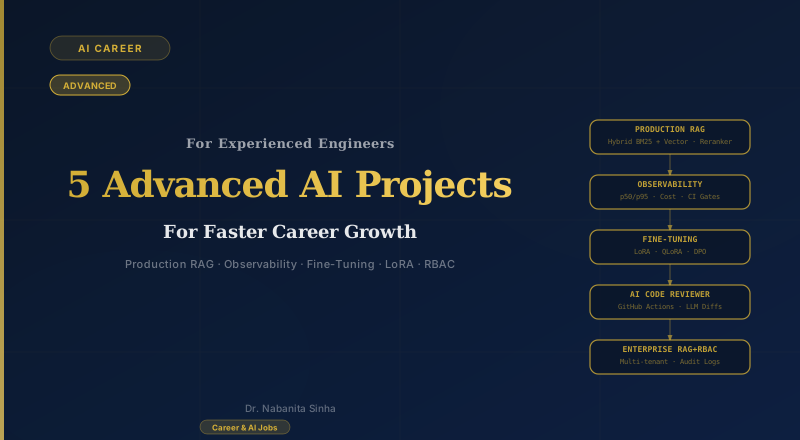
The five projects below are drawn from real patterns at companies like Google, Microsoft, and leading AI startups — described by engineers who have been on both sides of the hiring table. What they share is not complexity for its own sake. Each one targets a specific capability gap that companies cannot easily hire for:
- Knowing how to evaluate an AI system, not just build one
- Understanding production observability — latency, cost, quality over time
- Fine-tuning models for specific tasks with before/after proof
- Integrating AI into real engineering workflows (CI/CD)
- Building for regulated environments with access control and audit trails
- Architecting multi-agent systems that terminate reliably and fail gracefully — with full observability
The senior-level rule
Pick one project. Build it fully. Then write the number — accuracy, latency, cost, or quality improvement — that proves it works. One project with real metrics outweighs five demos every time.
Enterprise RAG: Hybrid Retrieval, Evaluation Pipeline & Access Control
BM25 + Vector · RAGAS · CI Gates · RBAC · Audit Logging
Why this project
RAG demos are everywhere. Enterprise RAG is rare. The gap between a demo that works 70% of the time and a system trusted enough to deploy in a bank or hospital is built from three things: retrieval that is measurably better, a quality gate that fails CI when accuracy drops, and access control that ensures every user only sees documents they are authorised to read. This single project covers all three.
What to build
Build a domain-specific document Q&A system — legal contracts, HR policy, financial reports — with hybrid retrieval, a RAGAS evaluation pipeline wired into CI, and a multi-tenant access layer where each user's queries only return documents their role allows.
How to build it
Phase 1: Production-Grade Retrieval
Ingest documents (PDF, markdown), chunk at 500–800 tokens with 100-token overlap, store embeddings in a vector store.
Add hybrid retrieval: combine BM25 keyword search with vector semantic search and merge results via Reciprocal Rank Fusion.
Add a cross-encoder reranker that rescores the top-20 chunks — this alone typically lifts precision 10–15%. Version your prompts in a config file, not hardcoded.
Phase 2: Evaluation & CI Gates
Curate a golden dataset: 50–200 question–answer pairs manually verified for correctness.
Write an offline eval script using RAGAS measuring faithfulness, answer relevancy, and context recall.
Wire the eval into GitHub Actions: any PR that drops faithfulness below your threshold fails the CI check and cannot merge.
Phase 3: Enterprise Access Control & Audit
Build a FastAPI backend with JWT-based authentication. Each user has roles (e.g., sales, legal, executive). Tag every document at ingestion with its allowed roles.
At query time, filter vector store retrieval by the user's role metadata. Add a second check against a PostgreSQL ACL table before any chunk reaches the LLM — defence in depth.
Log every query: timestamp, user ID, question, retrieved chunk IDs, and generated response. Build an audit dashboard. Add a data retention policy (logs archived after 90 days).
Tech stack
What makes it stand out
The combination is what makes this stand out: measurable retrieval quality (RAGAS score), a CI gate that rejects regressions, and a compliance-grade access layer with audit trails. Include a compliance section in your README — which GDPR/data-protection principles the design addresses. This is exactly what financial services and healthcare clients evaluate before signing off on a RAG deployment.
Agentic Customer Operations Copilot with Built-In Observability
LangGraph · Tool Use · Human Approval · LangSmith
Why this project
A dashboard alone is not a portfolio project. A customer operations copilot is: it receives a support ticket, reasons over company policies and past resolutions, checks account context, proposes the next action, and asks a human to approve anything consequential. The observability layer proves you can operate an agent safely after deployment.
What to build
Build an agentic support operations copilot for a SaaS company. A Router agent classifies each incoming ticket, a Research agent retrieves the relevant product documentation and past tickets, and an Action agent proposes a response, refund, escalation, or account change. The agent must pause for human approval before writing to a customer record or sending a message.
How to build it
Phase 1: Agent Workflow & Tools
Create a LangGraph workflow with Router, Research, Resolution, and Escalation nodes. Persist the ticket state so the workflow can pause and resume.
Give the Research agent safe read-only tools: search the product knowledge base, retrieve the customer's plan and recent tickets, and look up service-status incidents.
Give the Action agent typed tools for drafting a reply, creating an escalation, and proposing a refund — but require a human approval node before any write operation.
Phase 2: Guardrails & Human-in-the-Loop
Enforce least-privilege tool access: the Research agent cannot call action tools, and refund proposals above a threshold always escalate to a human.
Add prompt-injection protection for ticket text and retrieved documents. Treat external content as untrusted data, not instructions.
Build an approval screen showing the proposed action, supporting sources, confidence, estimated cost, and an Approve / Edit / Reject decision.
Phase 3: Production Observability
Trace every agent step in LangSmith: state transitions, tool calls, retrieved sources, model version, latency, token usage, and cost.
Expose Prometheus metrics and build Grafana dashboards for resolution time, approval rate, escalation rate, tool failures, p50/p95 latency, and cost per ticket.
Create a replayable evaluation set of 100 anonymised tickets. Fail CI if routing accuracy, groundedness, or safe-action rate falls below the agreed threshold.
Tech stack
What makes it stand out
Demo the full journey of one ticket: classification, evidence retrieval, proposed action, human approval, and final audit trail. Then show the trace and metrics for that run. The combination of a useful agentic workflow, safe tool permissions, human approval, and measurable production behaviour is much stronger than presenting observability as a standalone dashboard.
Fine-Tuning with LoRA and DPO
LoRA · QLoRA · DPO · HuggingFace PEFT · W&B
Why this project
Most engineers know how to call a fine-tuned model. Very few know how to create one. Fine-tuning with LoRA and preference alignment with DPO is a skill that immediately moves you into senior AI engineer territory — and the cost to do it has dropped to near-zero with free Colab GPUs.
What to build
Pick a specific, narrow task where a general-purpose LLM underperforms: structured JSON extraction from messy documents, precise tool-calling format, domain-specific code generation. Fine-tune a 7B model to do that one thing significantly better than the base model, and prove it with before/after numbers.
How to build it
Dataset & Baseline
Collect or generate 500–2,000 training examples for your target task. Quality matters far more than quantity.
Establish a baseline: measure the base model's performance on a held-out test set of 100 examples. Record exact metrics (accuracy, F1, or task-specific score).
Fine-Tuning with QLoRA
Use Unsloth + PEFT to apply QLoRA (4-bit quantisation + LoRA adapters) to a 7B model. This runs on a free Colab T4 GPU.
Train for 1–3 epochs. Track training loss and eval loss on W&B. Stop early if eval loss plateaus.
Run the same 100-example test: record the improvement over baseline.
Preference Alignment with DPO
Collect preference pairs: for 200 examples, generate two model outputs and label which is better.
Apply Direct Preference Optimisation (DPO) to steer the model away from the weaker-style outputs.
Re-run evals. Document the delta at each stage: base → LoRA → DPO.
Tech stack
What makes it stand out
The before/after table with exact numbers is the project. 'I fine-tuned Llama 3.2 on structured JSON extraction. Base model: 61% accuracy. After QLoRA: 84%. After DPO: 89%.' That is a job offer in a table.
AI-Powered Code Reviewer on GitHub Actions
GitHub Actions · GitHub API · LLM · Python
Why this project
Every engineering team reviews code. An AI layer that catches logic errors, security issues, and style violations on every PR is immediately valuable — and building one shows you can integrate AI into real development workflows, not just demos.
What to build
Build a GitHub Actions workflow that triggers on every pull request. The workflow calls an LLM to review the diff, produces structured feedback by file and line, and posts it as review comments directly on the PR.
How to build it
GitHub Integration
Create a GitHub App or use a PAT token. Set up a GitHub Actions workflow that triggers on pull_request events.
Use the GitHub API (PyGitHub) to fetch the PR diff: which files changed, which lines were added.
LLM Review Logic
For each changed file, send the diff to the LLM with a structured prompt: review for correctness, security issues, performance concerns, and code style.
Enforce structured output (Pydantic): the LLM must return a list of comments, each with a file path, line number, severity (info/warning/error), and description.
Filter out low-confidence comments — only post comments the model scores above a confidence threshold.
PR Comment Posting
Use the GitHub Review API to post comments on the exact lines of the PR diff.
Add a summary comment at the top: total issues found, severity breakdown, and an overall assessment.
Add a "skip" label: if the PR author adds `ai-review: skip`, the workflow exits cleanly.
Tech stack
What makes it stand out
Add evaluation: over time, track which AI comments are resolved vs. dismissed by the human reviewer. This gives you a precision metric — and shows you treat the AI as a system to improve, not a black box to trust.
Multi-Agent Research & Report Generation System
LangGraph · Planner-Critic · Agent Orchestration · Tool Use
Why this project
Multi-agent systems are where enterprise AI is heading. Companies like Salesforce, Microsoft, and Google are deploying agent frameworks to automate complex multi-step workflows — market research, due diligence, incident triage, compliance analysis. Engineers who can architect reliable, observable multi-agent pipelines are among the most in-demand AI specialists right now, and almost no portfolio demonstrates this.
What to build
Build a system of co-operating agents that takes a research query, decomposes it into sub-tasks, dispatches each to a specialist agent, co-ordinates their outputs, and delivers a structured report — with a Critic agent that reviews the draft for unsupported claims before final delivery. The whole system is traced end-to-end in LangSmith.
How to build it
Phase 1: Agent Architecture
Planner Agent: receives the user query and decomposes it into 3–5 sub-tasks (e.g. 'find recent news', 'retrieve internal documents', 'analyse financials'). Outputs a typed task list using Pydantic structured output.
Researcher Agent: given a sub-task, performs web search via Tavily + RAG retrieval from a ChromaDB store. Returns sources with confidence scores.
Analyst Agent: receives structured data from the Researcher, runs computations (e.g. trend calculations, comparisons), and produces summarised findings.
Writer Agent: merges all findings into a coherent structured report (executive summary, sections, citations).
Phase 2: Critic Loop & Termination
Critic Agent: reviews the draft report, flags claims that have no source citation, and returns a list of gaps. If gaps exist, the Planner re-dispatches targeted research sub-tasks — but caps at 2 revision cycles to prevent infinite loops.
Define explicit termination conditions in LangGraph: task complete (Critic approves), max iterations reached, or agent error. Never let the graph run unbounded.
Add human-in-the-loop: after the first draft, pause the graph and surface it to the user for optional feedback before the Critic runs.
Phase 3: Observability & Failure Isolation
Trace every agent invocation in LangSmith: which agent ran, what input it received, what it returned, how long it took, and how many tokens it consumed.
Isolate failures: wrap each agent call in a try/except. If the Analyst agent fails, the Planner should reroute that sub-task to the Researcher rather than crashing the whole graph.
Add a trust score to the final report: tag each claim with its source agent and a confidence level (high / medium / low). This makes the output auditable, not a black box.
Tech stack
What makes it stand out
Include an architecture diagram in your README showing the agent graph — nodes, edges, decision points, and the Critic feedback loop. Add a table comparing single-agent vs. multi-agent output on 10 test queries (accuracy, completeness, citations). Engineers who can show they have designed around the hardest multi-agent problems — termination, failure isolation, and observability — are exactly who frontier AI teams are hiring.
Key Takeaways
- The gap between a working demo and a production system is where senior engineers live. Each of these projects targets that gap explicitly.
- Metrics are non-negotiable. Accuracy, latency, cost, quality deltas — write a number for every project or the project is incomplete.
- CI/CD integration (GitHub Actions eval gates, automated regression alerts) is the single fastest way to signal production-readiness.
- Regulated environments reward documentation. A README that addresses compliance, audit trails, and access control is rare and memorable.
- Build one project all the way. Depth beats breadth at senior level — a fully instrumented, evaluated, deployed project > five half-finished ones.
New to AI engineering?
Start with the beginner article — 5 projects for freshers to get hired